Microsoft 365 backup you can prove is restorable.
Open-source, self-hosted backup for Microsoft 365 and IMAP. Every backup is read back through the restore path and compared byte for byte before Restow calls it restorable.
restore check: weekly, per mailbox and OneDrive
sample: ≈20 mails, 20 files, calendar, contacts
method: read back, compared byte for byte
shown as: recovery readiness on the Overview
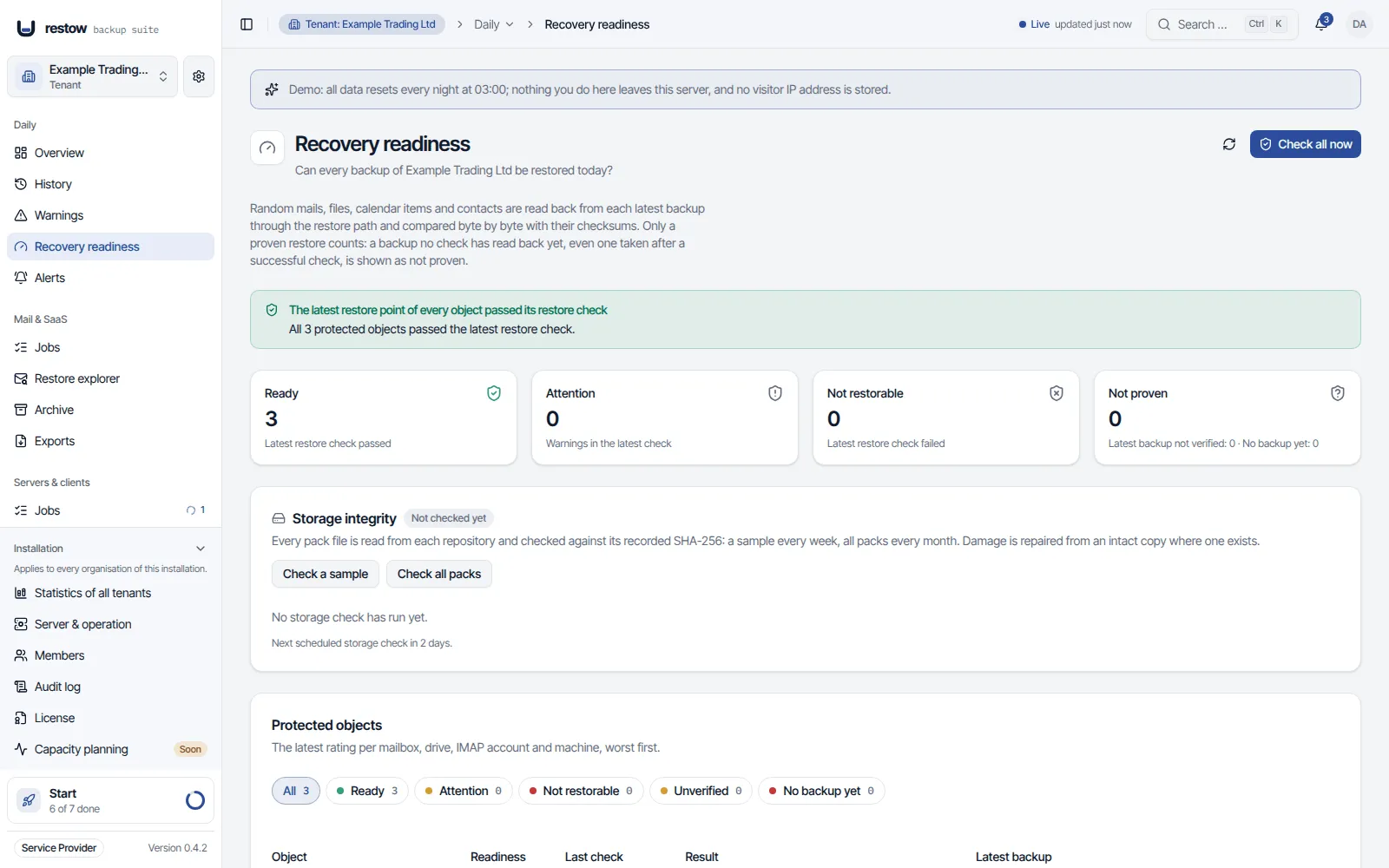
Screenshot from the public demo, unretouched, with synthetic sample data.Nothing here is a mockup.
Back up, verify, restore. In that order, every week.
Back up
Exchange Online mail, calendar, contacts, OneDrive and SharePoint sites through the Graph API, IMAP mailboxes over IMAP, Linux and macOS servers and clients with an agent, SMB and NFS file shares and Proxmox VE guests from the server, and imported mail files. Incremental, deduplicated, encrypted, on your storage.
Verify
A weekly job reads a sample from each latest snapshot back through the restore path and compares hashes. A backup that was never checked is never shown as proven. For servers and clients, the sample the agent recorded is read back from the repository after each new backup, and file shares are checked the same way after each new restore point; Proxmox VE guests are read back within minutes of each new restore point. How restorability is checked
Restore
A single message, a folder, an older file version or a whole mailbox, into the original account or another one. The same path an emergency restore uses.
Back up
Mail, calendar, contacts and OneDrive, incremental and encrypted, on your storage.
Pick a sample
Every week, per mailbox and OneDrive: about 20 mails, 20 files, calendar and contacts.
Read it back
From the latest backup, through the same path a real restore uses.
Compare
Byte for byte against the recorded checksums. Only a match counts.
Shown per mailbox as recovery readiness
- ReadyLatest check passed
- AttentionWarnings in the check
- Not restorableCheck failed
- UnverifiedNot read back yet
Restore is non-destructive: recovered items go next to what is already there, never over it.
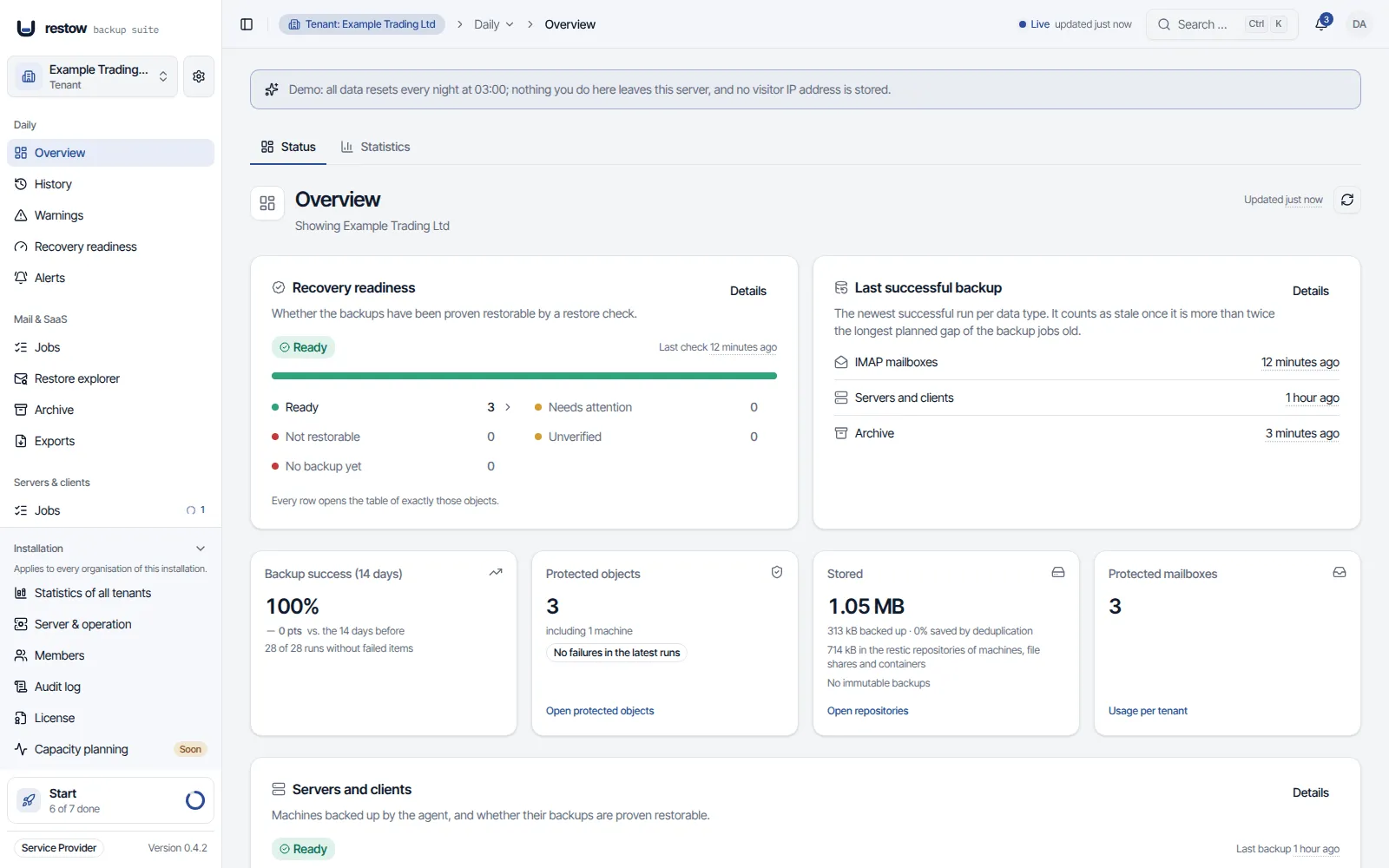
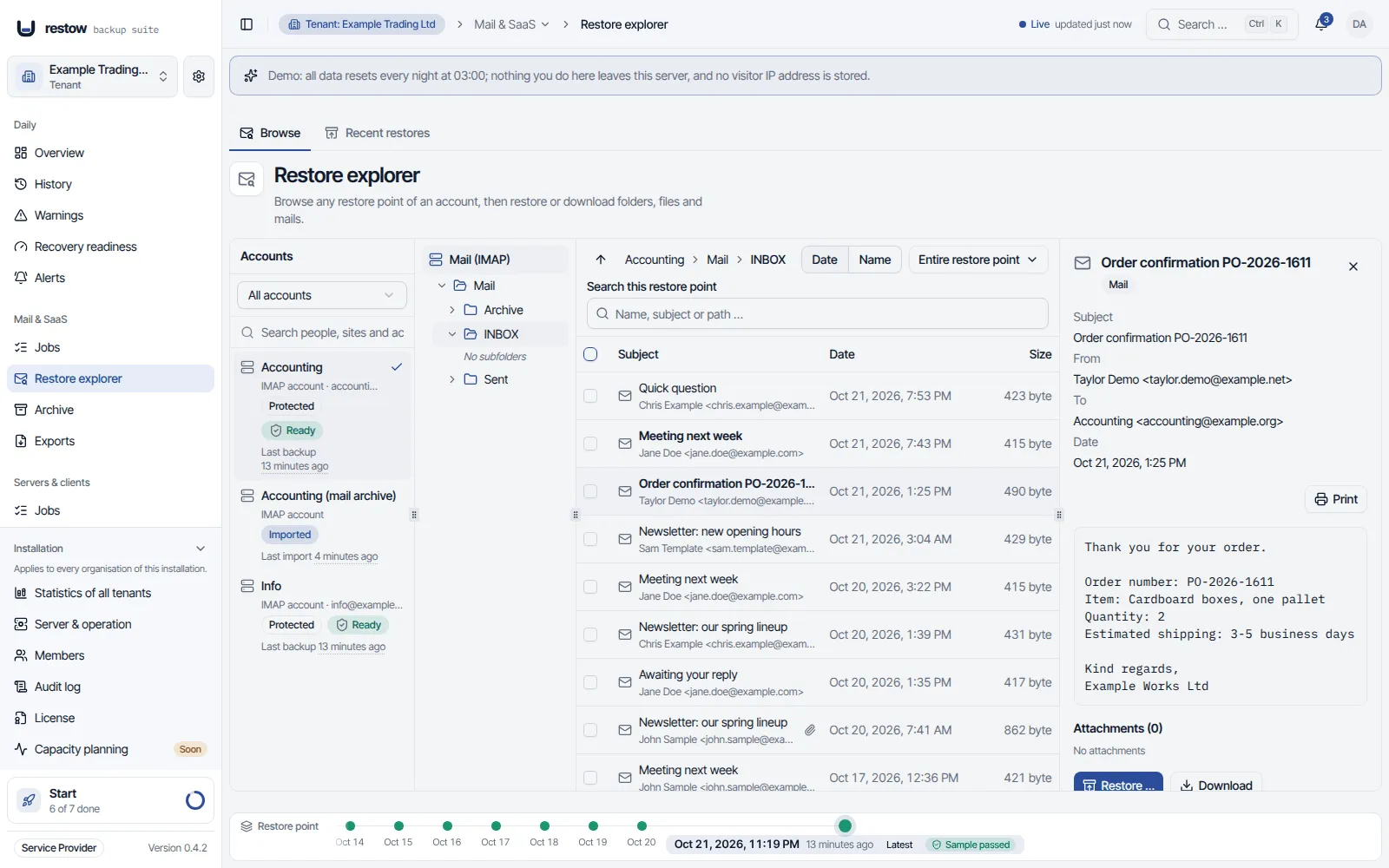
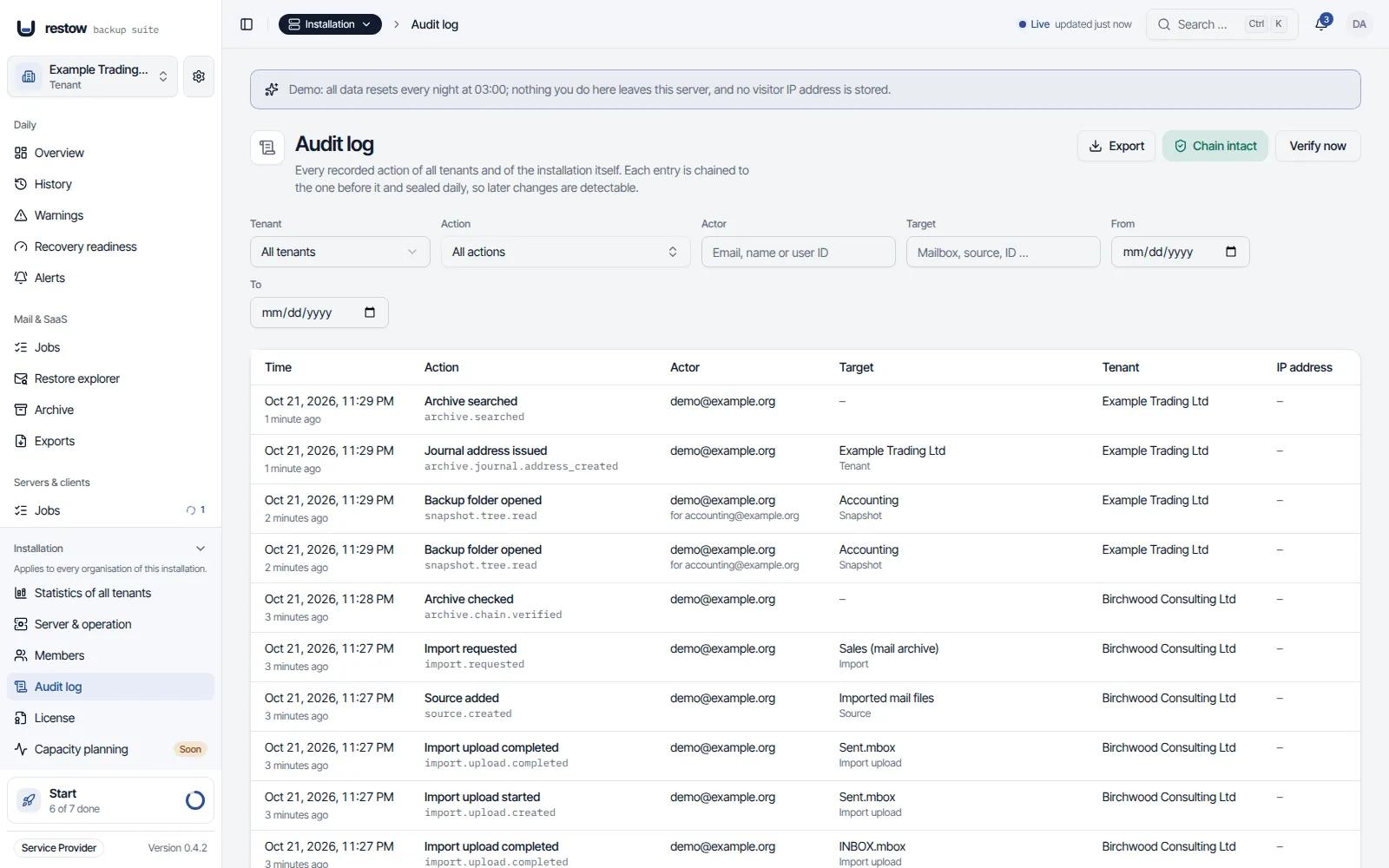
What the product looks like
Unretouched screenshots from the public demo with synthetic tenants.
What Restow protects today
Available today
Microsoft 365
Mail, calendar, contacts, OneDrive and SharePoint
IMAP
Mailboxes with password sign-in
Servers and clients
Linux and macOS agents, SMB and NFS shares
Proxmox VEpreview
VMs and containers, boot tests, 8.4 and newer
Restore checks
Read back weekly, ransomware detection
Archive and immutability
Hash chain, search, export, S3 Object Lock
GoBD layerfrom Business
Mailbox capture, journal receipt, retention, legal hold
Multi-tenantService Provider
Many customers, delegated admins
Known limits (11)
- Teams chats are not backed up. SharePoint Online backup is new: attachments of list items, site design, navigation and workflows are not backed up, permissions are kept as information only, and it was tested against a simulated Microsoft Graph only.
- Proxmox VE is a preview and not yet recommended as the only backup. It was tested against qemu-nbd, qemu-img and restic and, for progress, boot tests, file restore, stopping a backup, the check after every backup and its retry when a repository is locked, against the simulated node of the test suites, not against a real Proxmox VE cluster. The redesigned VMs & containers page was tested with DOM tests, not visually in a browser with thousands of guests. File restore of VMs is a preview of its own and cannot read btrfs, ZFS, ReFS, LVM thin, RAID, BitLocker or LUKS.
- File shares were tested against Samba, not against Windows Server, a Synology or TrueNAS share or real NFS exports. There is no VSS over SMB, so files that are open with an exclusive lock are skipped.
- A file share whose repository went missing after a storage change is not yet healed with a new backup chain the way a container's is; that is planned.
- Mounting an NFS share from the web interface, or from the path field of a repository, and moving the database were tested against stand-ins, not against a real NFS server or a real updater.
- Immutable backups are off until an administrator turns them on. S3 Object Lock was tested against a simulated S3 only, and the installation's default repository cannot be made immutable. On local directories and NFS shares only Restow's own code refuses a deletion (a deletion delay), not the storage.
- Ransomware detection judges what the backup saw change and was tested with simulated attacks, not with live ransomware. It flags and pauses retention, never blocks a backup and is no virus scanner.
- Archive capture from the mailboxes (Microsoft Graph, IMAP sync and forwarded copies, since 0.4.4; Business and Service Provider) was tested against simulated services and the Dovecot of the release smoke run, not against a real Microsoft 365 or Google Workspace tenant, Postfix, mailcow or hoster. Graph and IMAP capture are near-time and not complete, and Restow cannot see whether a Microsoft 365 tenant keeps deleted mail: an administrator confirms it.
- There is no Windows agent yet. A Windows file server can be backed up without an agent as an SMB file share.
- The first backup of a large Microsoft 365 tenant can take days, because Microsoft throttles the Graph API. Restow shows that wait instead of hiding it.
- Release checks: the automated Microsoft 365 backup and restore check against a real tenant is not active yet. Check 4 of the release pipeline, run against a dev tenant, was skipped in every release so far. Microsoft 365 is covered by tests against a simulated Graph API. Restow is a beta: run it alongside your existing backups until you have verified restores against your own data.
Editions
Everything you need to back up is free. Everything your organisation needs to sign off on is Business.
Early access Restow is in beta: until general release, Business and Service Provider are sold at the pre-sale price. The license is yours for good; what is marked "planned" follows as it ships, without dates. Not to be used as your only backup. You can return the license within 30 days, without giving reasons.
Community
Free
One organisation. Every backup source, every restore function, no mailbox limit, no license key.
- Microsoft 365 (SharePoint included) and IMAP backup
- Non-destructive restore
- Weekly restore checks
- Server and client backup (Linux, macOS)
- File share backup (SMB, NFS)
- Proxmox VE backup, VMs and containers (preview)
- Mail file import and export
- Archive with hash chain, search and export
- Immutable backups (S3 Object Lock) and ransomware detection
- Failure explanations, job history, REST API
- Several administrators with roles
For one organisation that runs its own backup.
Business
Pre-sale price€476List price from release: €595 −20% beta pre-saleonce, net, plus VAT
Pre-sale price €476 net until general release. List price from release: €595 net.
Everything in Community, plus what an organisation needs to prove. A perpetual license for one organisation.
Unlocks today
- Scheduled reports (daily, weekly or monthly summary by e-mail)
- GoBD layer for the archive (Exchange Online journal receipt and forwarded copies, enforced retention, legal hold)
- Archive capture beyond journaling (Microsoft 365 by Graph, IMAP and Google Workspace by IMAP sync, copies a mail provider forwards; Graph and IMAP are near-time, not complete)
- Audit log viewer (search, filters, details, hash-chain verification)
- Audit log export (CSV, JSON with hashes)
Planned, without dates
- Sign-in with Microsoft and single sign-on (SSO)
- Four-eyes approval
- Signed restore proof
For one company. Business customers only (§ 14 BGB).
Buy Business · €476Early access license for software in beta
Service Provider
Pre-sale price€1,560List price from release: €1,950 −20% beta pre-saleonce, net, plus VAT
Pre-sale price €1,560 net until general release. List price from release: €1,950 net.
Everything in Business, for any number of tenants: your own customers. A perpetual license.
Unlocks today
- Multiple tenants and the cross-tenant REST API
- Delegated tenant administrators (a customer's own administrators, limited to their tenant)
- Provider overview across all tenants (status per tenant, alerts)
- All tenants in Jobs: every tenant's jobs and runs at a glance
Planned, without dates
- White label
For IT service providers. Business customers only (§ 14 BGB).
Buy Service Provider · €1,560Early access license for software in beta
- Invoice and contract from IT Systeme Flores UG, Germany.
- No phone-home, nothing that can switch the software off.
- If we stop: twelve months' notice, then the modules become open source.
- Open, documented format: you can restore without us.
| Included | Community | Business | Service Provider |
|---|---|---|---|
| Available now | |||
| Microsoft 365 backup and restore (mail, calendar, contacts, OneDrive) | Yes | Yes | Yes |
| IMAP backup and restore | Yes | Yes | Yes |
| Non-destructive restore (never overwrites the original) | Yes | Yes | Yes |
| Weekly recovery readiness checks (a sample is read back and verified) | Yes | Yes | Yes |
| Basic operations log (job history, error messages) | Yes | Yes | Yes |
| REST API | Yes | Yes | Yes |
| Alerts by e-mail, in-app, webhook and chat message (Discord, Slack, Microsoft Teams) for failed backups, failed restore checks, overdue backups and storage damage | Yes | Yes | Yes |
| Mailbox limit | None | None | None |
| Archive with SHA-256 hash chain, chain verification, search, reading and export; filled by mail import with archiving | Yes | Yes | Yes |
| Several administrators with roles (members); limiting a member to chosen tenants is Service Provider | Yes | Yes | Yes |
| Scheduled reports (daily, weekly or monthly summary by e-mail) | No | Yes | Yes |
| GoBD layer for the archive (Exchange Online journal receipt and forwarded copies, enforced retention, legal hold) | No | Yes | Yes |
| Archive capture beyond journaling (Microsoft 365 by Graph, IMAP and Google Workspace by IMAP sync, copies a mail provider forwards; Graph and IMAP are near-time, not complete) | No | Yes | Yes |
| Audit log viewer (search, filters, details, hash-chain verification) | Recorded, no viewer | Yes | Yes |
| Audit log export (CSV, JSON with hashes) | No | Yes | Yes |
| Multiple tenants and the cross-tenant REST API | One tenant | One tenant | Yes |
| Delegated tenant administrators (a customer's own administrators, limited to their tenant) | Tenant administrators and users can be invited | Tenant administrators and users can be invited | Yes |
| Provider overview across all tenants (status per tenant, alerts) | No | No | Yes |
| All tenants in Jobs: every tenant's jobs and runs at a glance | No | No | Yes |
| Server and client backup with an agent (Linux and macOS, file-level, append-only) | Yes | Yes | Yes |
| Proxmox VE 8.4 and newer: VMs and containers (preview) | Yes (preview) | Yes (preview) | Yes (preview) |
| NFS shares added from the web interface (opt-in mounter) or by NFS address in a repository's path field | Yes | Yes | Yes |
| File share backup: SMB and NFS shares, Windows file servers included, without an agent and with permissions kept | Yes | Yes | Yes |
| Ransomware detection on every new restore point, with a retention hold while a finding is unresolved | Yes | Yes | Yes |
| Immutable backups: S3 Object Lock per repository (compliance or governance) and a deletion delay for directories, off until you turn it on | Yes | Yes | Yes |
| Notification matrix: choose per channel (bell, webhook, recipient) which events it gets | Yes | Yes | Yes |
| Proxmox VE: progress of running backups, boot tests of restore points and file restore of containers and VMs (preview) | Yes (preview) | Yes (preview) | Yes (preview) |
| Agent policies for servers and clients: backup window, catching up missed backups, upload limit, AC power, retries | Yes | Yes | Yes |
| File restore for restore operators (the restore role): machines and Proxmox VE guests | Yes | Yes | Yes |
| SharePoint Online backup and restore: sites with document libraries and lists | Yes | Yes | Yes |
| Updates that wait for or cleanly stop running backups, moving the database to another disk, and low disk space warnings (also for the system disk and a repository on it) | Yes | Yes | Yes |
| Storage growth on the dashboard, with an estimate of when the repository runs full where its free space is known | Yes | Yes | Yes |
| Microsoft 365 groups (the groups behind Teams included): calendar and conversations, opt-in | Yes | Yes | Yes |
| Remove a revoked machine from Restow, deleting its backups at once or when they expire | Yes | Yes | Yes |
| Stop a backup from the web app: Proxmox VE, servers and clients and file shares, or every backup of a job from the job lists (the run ends as cancelled, every stop asks first and is audited) | Yes | Yes | Yes |
| Planned updates at a chosen date and time, with a time zone of the installation set in the setup wizard | Yes | Yes | Yes |
| Proxmox VE nodes and agents follow a server update (new runs wait up to 15 minutes), with an update on request per node and machine | Yes | Yes | Yes |
| Proxmox VE: every new restore point is checked within minutes of its backup (on by default), with "Check now" and "Check all unverified" (preview) | Yes (preview) | Yes (preview) | Yes (preview) |
| Restore explorer by person (mailbox, OneDrive and IMAP together, SharePoint and Teams sites and Microsoft 365 groups apart), a calendar by month, and large mailboxes and OneDrives that open in milliseconds | Yes | Yes | Yes |
| Microsoft 365 sources through a Graph app of your own per source, besides the consent invitation | Yes | Yes | Yes |
| Mail file import (EML, MSG, MBOX, MailStore export) and export (EML ZIP, MBOX) | Yes | Yes | Yes |
| Failure explanations: what happened, why, and what to do | Yes | Yes | Yes |
| Update check (off until you turn it on) and an optional updater with automatic rollback until database migrations have run | Yes | Yes | Yes |
| Signed release images for amd64 and arm64 (full and Community build), with SBOM, and signed agent releases | Yes | Yes | Yes |
| Planned | |||
| Sign-in with Microsoft and single sign-on (SSO) | No | Planned | Planned |
| Four-eyes approval | No | Planned | Planned |
| Signed restore proof | No | Planned | Planned |
| White label | No | No | Planned |
| OAuth2 sign-in for IMAP sources (Microsoft 365 and Google over IMAP) | Planned | Planned | Planned |
| Windows agent (with VSS snapshots and image backup) | Planned | Planned | Planned |
| Agent mTLS and LVM, ZFS, btrfs and APFS snapshots | Planned | Planned | Planned |
| PST and OST import, PST and MSG export | Planned | Planned | Planned |
| SFTP repository | Planned | Planned | Planned |
Buy once, own it forever. A signed key, verified offline. No phone-home, nothing that can switch the software off, no subscription that lapses.
Updates, priced before 1.0. Pre-sale licenses include every 1.x update. From version 1.0, a license includes 12 months of updates; after that, an optional update year costs €295 (Business) or €595 (Service Provider) net, bought one year at a time, never renewed automatically. Without one, your last version keeps running with all modules, but without security fixes. How updates work
If we ever stop. We announce it twelve months in advance and then publish the Business and Service Provider modules as open source under the core's license, Apache 2.0. Your installation keeps running without a key. A license is software only: support, setup, operation and SLAs need a separate contract.
No mailbox limit. No edition limits how many mailboxes you protect. Business is licensed for one organisation, Service Provider for any number of tenants, your own customers. Restow does not count either: you use the license within what you bought.
Full pricing and terms · How Restow compares with 14 other vendors · What a backup costs per mailbox · Service Provider for MSPs
Your data is your data
Encrypted before it leaves the server
AES-256-GCM per chunk, a separate key per organisation.
Storage you choose
Local disk, S3-compatible object storage, NFS. More than one repository per organisation, and immutability (S3 Object Lock) can be turned on per repository.
An open, documented format
A small standalone tool restores from it even without a running Restow server. Losing Restow does not mean losing your backups.
No phone-home
No telemetry, no license server, no connection to us. Restow only talks to what you set up; the update check is off until you turn it on.
Open-source core
The core is open source under the Apache License 2.0, on GitHub. The Business and Service Provider modules are licensed under the Restow license terms.
How Restow is built, loop by loop
Who runs it
Run it yourself
A Docker Compose stack on a server you control. How Community and Business are normally used.
Have your IT service provider run it
Your provider installs and operates Restow for you, on their infrastructure or yours, under the Service Provider edition. Restow itself does not offer a hosted service. Multi-tenant backup for MSPs
About the project
Restow is built by Lucas Flores, owner of IT Systeme Flores UG, an IT service provider near Cologne. He looks after customers' Microsoft 365 environments, and Restow exists because he missed a backup that you run yourself, buy without a subscription and can see restoring.
The code is written with AI assistance. What goes into a release is decided by more than 10,000 automated tests and a smoke run whose report is attached to every release. The tests, the restore evidence and the storage format stay open, so that you can check this yourself.
By Lucas Flores, IT Systeme Flores UG · last updated 2026-10-16
Get Restow Community Edition
Community is free. Restow is a beta. Questions and ideas are welcome on Discord; report a bug or suggest a feature on the feedback page, no account needed.
Download the latest release
The Community images ghcr.io/restow-backup/restow-community and ghcr.io/restow-backup/restow-web-community (amd64 and arm64, signed with cosign, with SBOM), the install script (install.sh) and the release's Compose files (docker-compose.yml and env.example, in the repository under deploy/release) are published with every release, together with its release notes. Each release has its own fixed image tags and there is no latest image tag: for a manual Docker Compose setup, take the tags from the release notes of the latest release.
Get started
Recommended: a dedicated Linux VM (Debian 12 or 13, Ubuntu 22.04, 24.04 or 26.04, amd64 or arm64) on other hardware than the systems it backs up. Download install.sh and install.sh.sha256 from the latest release, check them with sha256sum -c install.sh.sha256, run sudo bash install.sh and choose the Community build when it asks. --local sets up an evaluation without a public domain, --with-updater adds the opt-in updater, and the mounter for file shares and NFS shares starts by default (--no-mounter leaves it out); installing by hand with Docker Compose stays possible. Restow is a beta: test it before you rely on it, and keep an independent backup alongside it.
License
Apache License 2.0. The Community images hold the core only, without the Business and Service Provider modules. A license key unlocks those in the full images (restow, restow-web). Both builds use the same database, so switching means changing the two image lines and running docker compose up -d.
Questions
What happens if Restow development ever stops?
We announce it at least twelve months in advance and then publish the Business and Service Provider modules as open source under the core's license, Apache 2.0. Your installation keeps running without a license key.
Do updates cost extra?
Not for licenses bought in the pre-sale: they include every update of the 1.x series. From version 1.0, a license includes 12 months of updates; after that, an optional update year costs €295 (Business) or €595 (Service Provider) net, bought one year at a time and never renewed automatically. Without one, every version released until then keeps running with all modules, but older versions get no security fixes. After a gap, the next update year costs the normal price, with no back payment.
Where is my data stored?
Wherever you point Restow: local storage, S3-compatible object storage, NFS. If your IT service provider runs Restow for you, they tell you where. Restow itself never stores your data on our infrastructure. Where a backup lands is named on the guest, machine and file share pages and in the job editors, with a warning when that is a directory on the server's own disk.
What Microsoft 365 permissions does Restow need?
An Entra ID app registration that your tenant administrator consents to once, with Graph application permissions scoped to backup and restore. Alternatively, since 0.2.2, a source can use a Graph app that your tenant administrator creates in your own tenant. Restow only uses Graph, never EWS (Microsoft began switching EWS off for Exchange Online on 1 October 2026) and never legacy authentication. SharePoint Online backup needs the added application permission Sites.ReadWrite.All (Sites.Read.All is enough to back up, not to restore) and a new consent from your tenant administrator. The exact list is in the documentation.
Is the archive available?
Yes, with limits, since 0.1.0. Every edition, Community included, has the archive: an append-only store with a SHA-256 hash chain, chain verification (every link, the daily anchors and optionally a sample of message contents), export, reading and download as .eml, and search over subject, addresses and the body text of imported mail, with filters by sender, date and mailbox (attachments are not searched). It is filled by mail import with archiving; since 0.3.1 there is an archive per mail job, and since 0.4.2 the mail job editor first asks whether a job backs up, archives or both. Business and Service Provider add the layer designed for GoBD-compliant use: Exchange Online journal receipt over SMTP and, since 0.4.4, copies that a mail provider forwards (both capture in transport; the receiver needs a TLS certificate of your own, and journal reports are assigned to the mailboxes they name), enforced retention and legal hold. Since 0.4.4 they also capture from the mailboxes: Microsoft 365 by Graph change notifications and IMAP and Google Workspace by IMAP sync, each with a one-time takeover of the mail already there and one archived item per mail however many ways captured it. That capture is near-time and not complete (a mail moved or deleted right after delivery can be missed) and was tested against simulated services, not against a real Microsoft 365 or Google Workspace tenant. A mail job that archived before 0.4.4 keeps journaling only until an administrator switches another way on. Since 0.4.0 an administrator can turn on immutability per repository: S3 Object Lock locks the packs, manifests and keys of the chunk store, and on local directories and NFS shares a deletion delay makes Restow's own code refuse to delete or overwrite, which protects against misuse of Restow but is not immutability by the storage. It is off until turned on and was tested against a simulated S3, not a real service. The archive is designed for GoBD-compliant use, not certified. Self-service archive search for end users is planned.
Can Restow back up servers and laptops?
Yes, on Linux and macOS, in every edition including Community. The backups run on restic, the well-known open-source backup program, so each machine's backup is a regular restic repository that restic itself can open with the machine's repository password, even without Restow. You run one install command on the machine; the script asks for a one-time token without showing it, checks the signature of the agent release and installs the agent in a folder only root can change. The agent connects outbound over HTTPS only and can add backups but never delete them. Restores go into a new folder or a ZIP download, and a restore test reads sampled files back and compares hashes. A running backup can be stopped from the web app (since 0.4.2) and ends as cancelled, not as failed. Windows, filesystem snapshots and disk images (bare-metal restore) are not available yet: the agent backs up files. They are planned, without a date. A Windows file server can be backed up without an agent as an SMB file share. Agent policies set a backup window, catching up missed backups, an upload limit, AC power and retries per installation, tenant or backup job. restic is an independent open-source project (BSD-2-Clause, restic.net); Restow is not affiliated with it.
Can Restow back up SMB and NFS file shares?
Yes, since 0.4.0, in every edition including Community. Restow mounts an SMB share (Windows Server, Samba, a NAS) or an NFS export read-only for one run from the server, without an agent on the file server, and backs it up with restic into a repository of its own, keeping NTFS permissions. Every new restore point is checked by reading sampled files back, and a running backup can be cancelled from the run drawer. You can restore as a ZIP, into a new folder, to the original location or into another share, with permissions where the target allows it. It was tested against Samba in the release smoke run, not against Windows Server, a Synology or TrueNAS share or real NFS exports, and files that are open with an exclusive lock are skipped, because there is no VSS over SMB.
Can Restow back up Proxmox VE?
Yes, as a preview since 0.3.1, in every edition including Community. Restow backs up virtual machines and containers on Proxmox VE 8.4 and newer through Proxmox's Backup Provider API: VM disks over NBD with dirty bitmaps, so only changed 4 MiB blocks are uploaded, and containers through restic. A restore creates a new VMID in the pool restow-restore. Since 0.3.2 one command connects a node. The node side is a storage plugin shim (a separate work under AGPL-3.0-or-later) and the helper restow-pve (Apache-2.0). Since 0.4.0 it also shows the progress of running backups, can boot the newest restore point of a guest in isolation as a boot test, and browses and downloads files of containers and, as a preview of its own, VMs. Since 0.4.2 a queued or running backup can be stopped from the web app, every new restore point is read back within minutes of its backup, and a container whose repository went missing begins a new backup chain. It is a preview: it was tested against qemu-nbd, qemu-img and restic and, for the newer functions, against the simulated node of the test suites, not against a real Proxmox VE cluster. It is not yet recommended as the only backup.
Does Restow protect backups from ransomware?
Two things, both since 0.4.0 and in every edition, and neither is a virus scanner. Immutable backups, off until an administrator turns them on per repository: S3 Object Lock (compliance or governance) keeps the storage itself from deleting locked data until the lock has run out, and for local directories and NFS shares a deletion delay makes Restow's own code refuse to delete or overwrite, which protects against misuse of Restow but not against someone with access to the server. Ransomware detection judges every new restore point from data the backup already has (amount of change, mass deletions, renamed or known ransomware extensions, ransom notes, encrypted-looking files) and, while a finding is unresolved, pauses retention so that clean older restore points are not pruned. It never blocks a backup. Object Lock was tested against a simulated S3 and the detection with simulated attacks, not with real ransomware, and the installation's default repository cannot be made immutable.
Can I import old mail from PST, MailStore or Thunderbird?
EML, MSG, MBOX (Thunderbird, Apple Mail) and MailStore exports in EML or MSG form can be imported as a legacy mailbox that you can browse, restore into Microsoft 365 or IMAP, download and optionally archive. PST and OST files are recognised and refused with an explanation; PST and OST import is planned. MailStore's internal archive format cannot be read, so export from MailStore first.
Does Restow update itself?
Not unless you switch it on. The update check is off until an administrator turns it on, and then only reads the release list of the source you chose (the public GitHub releases by default). An optional updater, a separate Compose profile, can apply an update with a database backup first and an automatic rollback; since 0.4.0 the update dialog asks what to do with backups that are running (stop them cleanly, wait for them, or do not wait), and since 0.4.2 an update can be planned for a chosen date and time, and Proxmox VE nodes and agents follow a server update while new runs wait, 15 minutes at most. The rollback applies only while the database migrations have not run; after a migration the updater stops, keeps the dump and tells you how to restore it. It needs the Docker socket, which is root on the host, so read the trade-off in the documentation before you enable it.
How do I know a release is genuine?
Every release comes as two builds, full and Community, in four images (restow, restow-web, restow-community, restow-web-community), each built for amd64 and arm64, signed with cosign and shipped with an SBOM; the documentation shows the command that verifies a signature. Every agent release is signed by the maintainer with an Ed25519 key, and the installer and the agent check that signature before they run anything; on a first install, compare the release key fingerprint the installer prints with the published one, SHA256: (also in the release notes). Before a release is published, a smoke run has to pass for both builds: fresh install, restores with hash comparison, endpoint backup, mail import, file share backup against Samba. The Microsoft 365 check against a dev tenant (check 4) is not active yet: it was skipped in every release so far. In the release checks, the agent installer runs in a Linux container only.
Is Restow open source?
The core is open source under the Apache License 2.0, on GitHub. The Business and Service Provider modules are licensed under the Restow license terms.
Can I try a live demo?
Yes, at demo.restowbackup.com: two fictional tenants with synthetic mail and 30 days of history. Browsing, statistics, backups, restore checks and restoring as a download work; restoring into a mailbox and changing sources, settings or users are locked. Everything resets every night at 03:00, and no visitor IP address is stored.